A GPS L1 label alone does not establish GLONASS G1 coverage. It also does not prove that G1 is unsupported: some manufacturers use “L1” as a broad GNSS antenna category. For a purchase decision, compare the named signals and documented frequency coverage of the exact antenna, every RF component and the terminal configuration—not just the label on one item.
GPS L1 and GLONASS G1 are not the same carrier
ESA’s GPS signal plan identifies the GPS L1 carrier at 1575.42 MHz. For legacy GLONASS L1 FDMA signals, often called G1 in product records, ESA’s GLONASS signal plan gives fk = 1602 + 0.5625k MHz, with channel numbers k = −7 through +6. The resulting carrier centres run from 1598.0625 to 1605.375 MHz.
Those endpoints describe carrier centres, not the complete occupied spectrum or a sufficient filter passband. Signal modulation extends around each carrier. Identify the signals and channels required by the receiver before comparing a component’s usable band. GLONASS also has modernized CDMA signals; for example, ESA lists L1OC at 1600.995 MHz. The legacy FDMA calculation is not a description of every GLONASS signal.
Why an L1 antenna label can still include G1
Read the detailed record before excluding a product. The Taoglas FXP611.07.0092C product page categorizes this passive antenna under “GNSS Bands: L1,” while separately listing GLONASS and a frequency range of 1559–1610 MHz. Here, the category label is broader than “GPS at 1575.42 MHz only.” This is a Taoglas antenna example, not a ResiNav terminal specification or a receiver-compatibility claim.
The useful buying distinction is therefore explicit multi-constellation coverage versus an unexplained label, rather than “L1 means GPS only.” A generic “GNSS antenna” or “L1 compatible” description without a named signal set or frequency record leaves the G1 requirement unresolved.
If you are choosing between more constellations and additional frequencies, compare which capability changes the GNSS purchase before selecting the signal path.
Keep three different specifications separate
1. Antenna reception range
Compare the exact antenna model’s named GNSS signals and stated operating range. For an active antenna, include its internal RF electronics and filtering in that review; the radiator’s range alone does not describe the complete active antenna output. A reception range is not a declaration of interference suppression.
2. RF component passband and processing coverage
For an inline filter, compare its documented passband and insertion loss over the wanted signal spectrum, not merely its centre frequency. For a processing component, use its declared processed signals or frequency range. An antenna cannot restore a wanted band rejected later in the chain. The u-blox GLONASS hardware application note, sections 2.7 and 3.2, illustrates this for historical u-blox 6 designs: a GPS-only SAW filter or filtering inside an active antenna can prevent the wider GPS/GLONASS path from being usable. Its circuit recommendations are specific to that hardware, not universal installation approval.
3. Terminal support and the next receiver
Use the terminal’s model-specific signal declaration for the supplied configuration. A listed RF output frequency, such as 1602 MHz, is not a published passband edge, filter response or channel-by-channel processing map. Likewise, a compatible frequency path does not establish that the next receiver decodes the required signals or accepts the terminal’s electrical interface. Keep the terminal support statement and receiver requirements distinct.
A wide antenna does not make a narrow RF path suitable
Hypothetical purchase comparison—not ResiNav hardware or a measured response: suppose antenna A declares GPS/GLONASS reception over 1559–1610 MHz, but proposed inline filter B documents a usable passband of only 1570–1580 MHz. GPS L1’s carrier sits inside B’s stated passband; the legacy G1 carrier centres above do not.
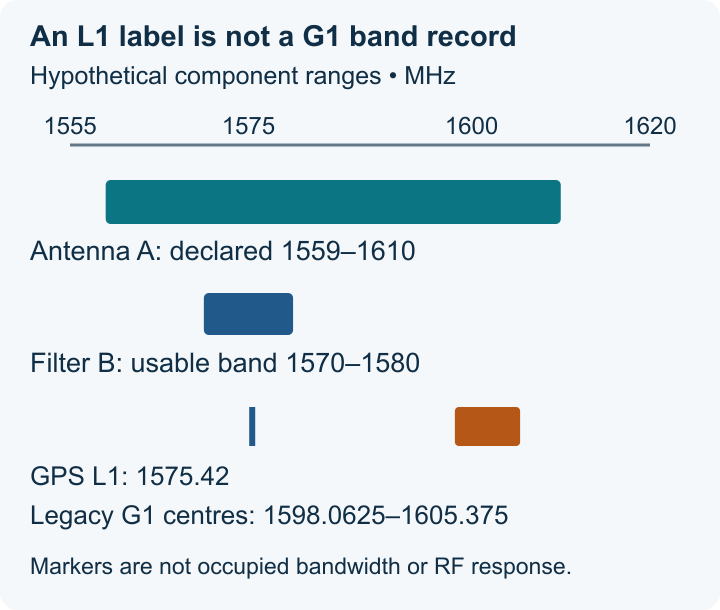
Do not shortlist A plus B as a documented GPS-and-G1 path. Replace B with a component whose documentation covers the required G1 signal spectrum, or choose a different documented chain. This does not mean the rejected combination has zero transmission at every G1 frequency; it means B’s stated usable band cannot substantiate the purchase requirement. A wider replacement still needs its actual insertion-loss and interface conditions checked.
Conversely, if an antenna record lists only GPS L1 and provides no G1 evidence, buying a wider downstream filter does not resolve the antenna specification. Choose a documented multi-constellation antenna or leave that candidate unqualified for G1. This separates a missing declaration from proof that a product cannot support the signal.
Apply the screen to published ResiNav records
For a terminal shortlist requiring published GLONASS G1 support, the current records explicitly list G1 for RN-009Pro-8CH-G1-WG-DT, RN-8AT-FULL-KGR-34V and RN2504-3T7A21C-WG-DT. RN2504 also explicitly lists Galileo E1. These are published terminal signal declarations, not measured filter curves or approval for an unspecified receiver.
By contrast, RN-S65-4CH-SNB publicly lists GPS L1 and BDS B1, but not G1. Do not count that record as a confirmed G1 match, and do not turn the omission into a claim that G1 is technically impossible. Compare the linked model specifications and English datasheets, then use the selected model’s enquiry button to carry the exact model into the existing quotation form.
For the remaining selection fields, use the published product comparison. If the purchase includes additional filtering, the adjacent-band interference guide explains the separate trade-off between retaining wanted signals and attenuating nearby interference.
NEXT STEP
Turn available platform information into an engineering review.
Use the Technology centre to frame the discussion, review relevant application scenarios, then send the available platform and receiver details for confirmation.